
If you care about secure logins or safe payments today, you can’t avoid two-factor authentication and one-time passcodes (OTPs). I see many teams still start with SMS for these codes, and that makes sense. It’s simple, and almost every phone can get it.
As is the case with every free market though, there are alternatives.
In this guide, we will go over:
- How SMS, WhatsApp, Viber, email and TOTP compare on reach, speed and security
- Where each channel is strong, where it struggles and how that affects your users
- How to build smart fallback flows so one failed channel does not block a login or payment
- How to choose the right mix for your product based on deliverability, fraud risk, reach and cost
Use it to review your current 2FA setup and pick upgrades you can ship this quarter.
Google’s data shows that even basic SMS OTP can block 100% of automated bots, 96% of bulk phishing, and 76% of targeted attacks. Not bad for a short text, right?
But SMS on its own is not perfect.
Sometimes messages arrive late or never show up. And fraudsters have learned a few tricks, like SIM swap scams and “smishing” attacks where fake texts try to fool your users. You’ve probably had a moment where you sat there thinking, “Where is my code?” while the spinner keeps loading.
The good news is that you’re not stuck with SMS only. You now have more ways to send OTPs, like WhatsApp, Viber, email, and authenticator apps that use TOTP.
When you mix these channels well, and set them up to kick in when one fails, you can seriously improve delivery and make life harder for fraudsters.
SMS OTP: The Ubiquitous Default
Let’s start with the classic you already know so well.
SMS is the workhorse of one-time passcodes. It has been around for decades and still works on almost every phone, from old flip phones to shiny new smartphones. No wonder you see SMS OTPs everywhere you look.
From Statista’s findings, about 98% of organisations worldwide use more than one way to verify users, and around 56% include SMS one-time codes in that mix. If someone has a mobile number, it is almost guaranteed that you can reach them with a text.
SMS does not need internet or a special app, which is a huge help when your users are on slow data, limited bundles, or basic phones. On top of that, people treat texts like high-priority messages. They see them immediately.
Studies show SMS has an open rate of around 98%, and 90% of messages are read within three minutes. For an OTP that expires fast, that kind of speed feels very reassuring for authentication processes.
So, SMS OTPs are familiar, quick, and reach almost everyone. That is a strong start. But like any tool, it has bright spots and weak spots. Let me walk you through both, so you can see where you might want a backup plan.
Strengths of SMS OTP
- Universal reach
I like SMS because it works almost everywhere. It reaches smartphones and simple feature phones without asking the user to install anything or connect to Wi-Fi. If the user has a mobile signal, you can usually send them a code, which is perfect for wide customer bases and rural areas where you cannot assume constant internet access.
- Immediate visibility
What happens when your phone flashes up with a text notification? You probably check it right away. Most users do the same, which is why those high open and read rates matter so much. For urgent passcodes, this habit makes SMS a very fast way to get attention.
- Easy to build into your app
From a tech point of view, SMS is friendly. Every common programming language and many API platforms support sending SMS with just a few steps. For basic OTP flows, you can get started without long approval cycles or strict template reviews that some chat apps require.
- Proven effectiveness
Even though it is old, SMS two-factor authentication still works well in practice. It greatly cuts down the risk of account takeovers and blocks many automated attacks. A solid extra step that most attackers do not bother to get past.
Weaknesses of SMS OTP
- Delivery issues
SMS is reliable most of the time. Key word: most. There are situations where it falls short. Messages can be delayed or lost because of carrier problems, network congestion, or spam filters.
In some regions, you might see delivery rates above 95%, while in others they can drop below 80%. That small slice of failed OTPs can still hurt when those users are stuck at the login screen and give up.
- Security risks
You also need to be honest about the security limits of SMS. A determined fraudster can carry out a SIM swap by tricking the mobile carrier into moving the victim’s number onto a new SIM. Once they control the number, they receive the OTP and can enter the account. In the UK, reports of SIM swap fraud rose 1,055% in 2024 alone, which is a huge jump.
SMS is not fully encrypted from end to end, so in rare cases attackers can exploit telecom flaws to intercept texts while they travel across the network.
On top of that, “smishing” attacks can trick users into sharing their codes with a fake website or fake support agent. None of this means SMS is ‘broken’, but it does mean you should think twice before using it alone for very high-risk authentication.
- Cost at scale
From your side as a business, every SMS OTP has a price tag. The fee per message may look small, but if you send millions of codes or work across many countries, the bill grows fast.
International SMS often costs more, and each carrier and region can have different rates.
It does not affect the comfort of the user, but it does affect your budget, which is why many teams add cheaper channels like WhatsApp, Viber, or email into the workflow.
- Limited branding and no rich content
A standard SMS is just plain text from a short code or a number that may look random. In many countries, you cannot easily show a clear brand name as the sender. Some users feel nervous when they see an unknown number asking them to type a code.
You can add a link, but if you do not manage it well, filters might treat it as spam. For simple OTPs this is workable, but chat apps often give you a cleaner and more branded feel.
When to Use SMS
So, when does SMS OTP make the most sense for you? I treat it as a very strong baseline. It is the channel you rely on when you need to reach almost any user, anywhere, without guessing what device they have or how good their internet is.
Industries like logistics and healthcare still lean heavily on SMS for that reason. Many of their users have basic phones or patchy data. Like a rural patient receiving an appointment code before a clinic visit, or a delivery driver confirming a drop-off with a customer through an OTP. In both cases, a simple text works better than a fancy app they may not have.
If you want a channel that is as close to universal as you can get, SMS is your go-to. But because of delivery gaps, rising fraud, and cost at high scale, I usually recommend pairing SMS with at least one backup channel or giving users a choice. That way, when the stakes are high or the action is critical, you are not depending on a single text message to keep everything running.
WhatsApp OTP: Secure and Friendly (If Your Users Have It)
WhatsApp started as a simple chat app, but now it’s a huge messaging platform with over 2.9 billion users worldwide. So it makes sense that many businesses send OTP codes there. In some countries, people even use WhatsApp more than SMS, which gives it a nice edge for logins and checks.
I work with teams that care a lot about both security and user comfort. When those two matter to you, WhatsApp often sits near the top of the list. It feels familiar to your users, but it also adds strong protection in the background.
Strengths of WhatsApp OTP
- End-to-end encryption
One big win with WhatsApp is the way it protects messages. OTPs are encrypted from your server all the way to the user’s phone. That means only that device can read the code. Not even WhatsApp staff can peek at it while it travels.
This cuts out many of the “code interception” risks you worry about with SMS. And that’s why the security-conscious fintech and banking teams like it so much.
- High delivery and open rates
WhatsApp sends messages over the internet instead of SMS routes that sometimes act up. If your user has Wi-Fi or mobile data, the OTP usually lands in seconds.
Plus users tend to respond to messages here quickly. One study found that 80% of WhatsApp messages are read within 5 minutes, and open rates are often around 98%. You get the same quick reaction you see with SMS, but with the stability of an online service.
- Cost-effective at scale
When you send a few OTPs, the cost per text may not bother you. But when you send thousands or millions, you feel every cent.
In many regions, WhatsApp Business API pricing is kinder than SMS. You are often charged per template or per conversation, not per single message. When I model costs for large OTP flows, WhatsApp can deliver serious savings.
- Rich user experience
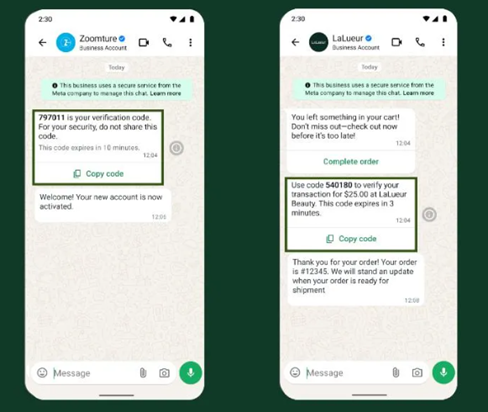
With WhatsApp, your OTP comes from a verified business profile with your brand name and a green checkmark. Your users do not have to guess if “ThisCode123” is you or a scammer. You can add your logo, a clean layout, and even a one-tap “Copy code” button.
This is where users really notice the difference. It allows branding and usability features that SMS can’t. Small touches like that make logins feel smoother and more trustworthy.
- Multi-device and global convenience
WhatsApp runs on data, so it keeps working in situations where SMS might fail. Think of a user on a trip abroad with SMS roaming turned off but with hotel Wi-Fi. The SMS may never arrive, but the WhatsApp OTP drops in just fine. Or someone in a building with poor cell reception — as long as there’s Wi-Fi, they can still log in easily.
Some companies even see better success with WhatsApp than SMS. For example, Indonesia’s Tokopedia added WhatsApp OTP and saw a 58% higher delivery rate for user verification compared to SMS. That is a big jump for one small change.
Weaknesses of WhatsApp OTP
- Users must have WhatsApp
This sounds obvious, but it is a critical limitation. The user needs the app installed and an active account linked to their number. If they don’t use WhatsApp (or rarely check it), sending an OTP there doesn’t help
WhatsApp’s user base is huge globally, but there are pockets (certain countries or demographics) that prefer other channels. In North America, for example, its market share stands at 32%, and in China it loses out to WeChat and local rules. So WhatsApp OTP only makes sense if a big part of your audience actually lives on WhatsApp.
- Needs internet or data
No data, no WhatsApp. If a user has no internet connection, the OTP will not reach them, even if they have full mobile signal. SMS would still get through in that case. So you need to think about people in remote areas, users with limited data, or those who often keep their phones offline.
- Onboarding and compliance effort
From your side as a business, WhatsApp needs more setup than SMS. You have to go through WhatsApp Business API onboarding, often through a provider. You need to submit and approve OTP templates and follow WhatsApp rules, like getting user opt-in before you message them.
None of this is impossible, and I’ve helped many teams do it, but it is extra work compared to a simple SMS API.
- No OTP if the number is not on WhatsApp
If a phone number is not linked to a WhatsApp account, your OTP cannot land there at all. Sometimes you only find that out when you try to send the message. Some APIs can check this in advance, but not all teams use that.
This is not the end of the world if your flow handles it well. You just need a backup plan for those users, such as falling back to SMS. We will talk more about that sort of smart fallback pattern in a bit.
When to Use WhatsApp
WhatsApp OTPs are excellent for user bases that are already WhatsApp-heavy. If you serve users in places like Europe, Latin America, India, the Middle East, or big parts of Africa, there is a good chance WhatsApp is their daily chat app. In those markets, many fintech and banking apps now offer WhatsApp OTP because it feels safe, clear, and easy to spot as “from the bank”.
One nice example is Banco Azteca in Mexico. They moved new-account OTPs from SMS to WhatsApp and saw a 30% increase in successful account openings per month, along with a big lift in customer happiness. That is what happens when you meet users where they already are.
E-commerce brands and ride-hailing apps, like Tokopedia, also lean on WhatsApp for order and login checks for the same reason.
That said, I rarely suggest replacing SMS completely. WhatsApp works best as part of a team. A common pattern I like is to try WhatsApp first, then fall back to SMS if the user is not on WhatsApp or does not respond in, say, 30 seconds. That way you get the rich, secure feel of WhatsApp without losing the reach of SMS.
For very high-risk actions, you should also remember that WhatsApp and SMS share one key issue. The OTP code still appears on the screen, and a user can be tricked into sharing it with a fake site or scammer. For those extra sensitive flows, I often recommend adding an authenticator app (TOTP) or stronger methods on top, which we will explore later.
Viber OTP: A Regional Powerhouse for Specific Markets
Rakuten Viber, or just Viber, is another chat app you can use for OTP codes. It is not as huge as WhatsApp everywhere, but in some countries it is a big deal and people use it every day.
In places like Eastern Europe, parts of the Middle East, North Africa, and Southeast Asia, Viber can be just as common as WhatsApp, or even more popular. If your users live there, Viber OTP can work very well for you. It gives you similar benefits: encryption, rich messaging, and lower costs for businesses.
I work with teams that send a lot of OTPs in those markets, and Viber comes up a lot in those talks. Here’s where we see it shines, and where you need to be careful:
Strengths of Viber OTP
- Strong security with encrypted messages
Like WhatsApp, Viber uses end-to-end encryption for private chats. When you send an OTP over Viber, the code is encrypted and only the right user can see it.
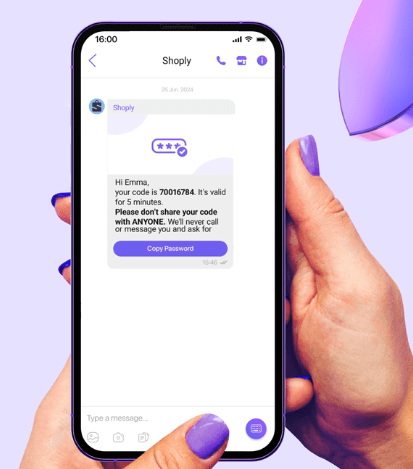
Viber has also doubled down on security features for business communication too. For example, they introduced Verification Messages specifically for OTP use. These come with a verified sender name and even a one-tap copy feature.
From a security point of view, Viber OTP gives you the same protection from message interception as WhatsApp OTP.
- Cost-effective in the right regions
In many of its key markets, Viber is cheaper than SMS for OTP delivery. If you use Viber’s Business API, the messaging fees can be lower than what you pay to mobile networks for international SMS. Viber itself promotes this as “encrypted OTPs at lower costs” than old-school SMS. If a lot of your users are on Viber, sending codes there can cut your OTP bill in a big way.
- High engagement where Viber is popular
Viber’s global active user base is smaller than WhatsApp at around 260 million monthly active users, but it absolutely dominates in certain countries. For example, about 71% of mobile users in the Philippines use Viber, and many Eastern European countries have a strong Viber culture.
If your product serves those regions, a Viber OTP can grab attention faster than an SMS. Businesses know this. Viber once reported a 506% year-on-year increase in transactional messages, which shows more brands are using it for things like OTPs and alerts.
- Branded business accounts
With Viber Business Messages, you can show a verified brand name and logo when you send the OTP. This gives users clear proof that the message really comes from you, not from a random number. You can also add rich content, buttons, or links if you need them, which feels much nicer than a plain text SMS.
- Built-in fallback with some providers
This is more specific, but some messaging vendors now offer a Viber+SMS combo. They first try to send the OTP over Viber, and if the user is not on Viber or does not get it, they switch to SMS automatically. It adds a bit of setup work, but it can boost your delivery rate. If you work with partners in Viber markets, this is a good question to ask them.
Weaknesses of Viber OTP
- You need users who actually have the app
Viber is very strong in some places and almost invisible in others. Many users in the U.S. or Western Europe do not have Viber at all. They might use WhatsApp, iMessage, or just SMS. That means Viber OTP only makes sense if you know your audience uses Viber often. It is not a “reach everyone” channel.
- Needs internet or data
Just like WhatsApp, Viber depends on an internet connection. No data and no Wi-Fi means no Viber message. If a user only has a basic mobile signal, SMS may still get through while Viber stays quiet. So if your users often go offline, Viber alone is risky for OTP delivery.
- Not always the first place users expect OTPs
Even in Viber-heavy countries, many people still expect OTPs by SMS or sometimes WhatsApp. If you start sending codes on Viber without telling users first, some may be confused or ignore the message. That’s all about user psychology. You can fix it with simple education in your flows, but it is something to keep in mind.
- Onboarding similar to WhatsApp
To send OTPs with Viber, you need to set up their business messaging service. That means registering an account, getting sender details and templates approved. It’s not difficult, but it’s another integration to manage (often through a provider that has a Viber API connection). You also still rely on the user’s phone number, just like with SMS or WhatsApp.
Because of that, most teams do not build a fully separate Viber flow. They add Viber as another route to that same number, often alongside SMS, so they can switch between channels as needed.
When to Use Viber
Viber OTP makes a lot of sense if your users live in countries where Viber is the main chat app. Many banks, fintechs, and delivery services in Eastern Europe do this already, because their customers are used to getting important updates on Viber and may ignore SMS. It is also a strong option in parts of the Middle East and Asia.
One nice example comes from Viber itself. They have worked with Eurobank in Greece to send sensitive one-time passcodes and banking details over the platform. The bank liked the extra encryption and the real-time number checks that help reduce fraud. That tells you Viber is not just for memes and stickers. It is already trusted for serious money flows.
If your data shows that many of your users are active on Viber, adding Viber OTP can raise your delivery and engagement while cutting costs. You might learn this from user surveys, past campaigns, or existing Viber conversations. Just make sure you always keep a safety net, such as SMS or email, for people who are not on Viber or who lose access to it.
I usually treat Viber as an add-on channel that helps you reach more people in the right regions, not as a full replacement for SMS. The only time it might fully replace SMS is in a closed user group where you are sure everyone is on Viber and uses it often.
Email OTP: Your Quiet but Reliable Backup
Email OTP is an oldie but a goldie. While not the flashiest way to send a one-time code, it’s a tried-and-true channel. It’s everywhere, and almost every user has it. When a code cannot reach a phone, or you did not collect a number, email often steps in as the verification method.
Most apps now give “Send code to my email” as an option next to SMS. That is not random. Email OTP has its own strengths and quirks, and it plays a big role in many signup and login flows.
Strengths of Email OTP
- Nearly universal reach
Email is one of the most common ways people talk online. There are over 4.48 billion email users worldwide, and that number keeps growing. Almost anyone who signs up for your product has an email address, even if they don’t want to share a phone number. If they have internet and check their inbox, you can get a code to them.
- No per-message cost
From your side, email is essentially free (or very low cost). Sending 100 emails or 100,000 rarely changes your bill in the way SMS does, where you pay for each single text.
This cost-effectiveness is a big draw for using email as an OTP channel, especially for secondary or fallback codes. If you are watching your costs, moving some OTP flows to email can take a big bite out of your authentication spend.
- Consistent across borders
Email rides on the internet, not mobile networks, so you skip many of the odd issues that show up with international SMS. A code sent to someone in another country usually arrives just as fast as a code sent locally. You do not need to worry about carrier rules, strange routes, or extra international fees.
- Rich content and branding
Email lets you design a friendly, clear OTP message instead of a plain text line.
You can include your branding, instructions, support links, and even dynamic content. For example, an email OTP message might have your logo, the code in large font, an expiration timer, and a “Trouble logging in? Contact support” footer. That’s certainly more user-friendly and informative than a terse SMS.
It’s also useful for localization. You can include longer multilingual instructions if needed (since email can handle lengthy content easily). This is handy if you serve users in many regions.
- Good for desktop-centric users
If your users are primarily on desktop (like a SaaS product for businesses), email OTPs can be very convenient..Many people already have their inbox open in a tab while they use a web app. For them, getting a code in email and copy-pasting it is fast and simple, sometimes even easier than picking up a phone to read an SMS.
Weaknesses of Email OTP
- Slower and lower engagement
People don’t usually rush to email the way they rush to a buzzing phone. Across industries, average email open rates sit around 20–30%, and many messages get opened much later in the day.
Now, an OTP email is a bit different – the user specifically requested it, so they are likely to check their inbox. However, they can still get delayed by filters, slow inbox refresh, or a cluttered mailbox.
While email delivery is near-instant under ideal conditions, such delays can frustrate users trying to log in now.
- Spam filtering and deliverability issues
Email has to fight spam filters all the time. Your code might be “delivered” but land in a Promotions tab or a junk folder, where the user never sees it. To keep OTP emails visible, you need proper sender settings, good domain reputation, and clean templates. That’s its own little project for your tech team.
- Security considerations
Email is also a favourite target for attackers (and accounts themselves are often secured by an OTP).
With many password resets and codes passing through that one inbox, risks are higher. If someone breaks into it, they can often see your OTP as well. That makes email a weaker second factor than SMS or an authenticator app, because you are relying on an account that is itself often protected by a similar method.
- Not suitable for phone number verification
Obvious but worth noting:Some flows need to prove that a phone number is real, like delivery, ride-hailing, or a wallet that sends alerts by SMS. Email OTP cannot help with that, because it only proves the user controls the inbox, not the phone. In those cases, you still need a phone-based OTP or a call to confirm the number.
- Users may not notice it quickly
Many people turn off email alerts on their phones or only check mail during work hours. They might request a code, switch to another app, and only open their inbox much later. For time-sensitive logins, that delay feels annoying, especially for users who are not very tech-savvy and don’t think to check different folders.
This is a user behavior aspect: email is often checked a bit more deliberately, not reflexively like texts (an SMS would ding instantly).
When to Use Email
I like to treat email OTP as a strong backup and complementary tool to other channels. It works well in “fallback” flows, such as “Didn’t get the SMS? [Click here] to send code via email instead.” It is also handy when you never asked for a phone number, which is common in many SaaS tools and internal systems.
You’ll see email OTP used a lot to confirm new device logins, approve changes to account details, or send passwordless login links. E-commerce customers already expect order updates in their inbox, so adding a code there fits neatly into their routine. Healthcare portals and company tools also lean on email because it is easier to roll out across a large group of staff or patients.
The key is to match email to flows that are not extremely time-critical or ultra-sensitive (or make it an option for users who prefer it). If the user is already in their inbox, a code or link there feels very natural. If they are on a mobile app and expect something instant, an SMS, WhatsApp, or Viber ping will usually feel smoother. Many teams let users pick a favourite channel in their profile for exactly this reason.
On the technical side, delivery rates for email are actually quite high in terms of successful transmission. More than 95% of legitimate emails reach some folder in the mailbox. The real challenges are human: whether the user notices the message in time, and how secure that inbox is in the first place.
When you mix email with SMS, WhatsApp, or Viber, you get a nice safety net. You catch users who fall through the cracks of your phone-based channels and give them another way to complete verification. In my experience, that kind of mix is what keeps both security and user experience in a healthy balance.
TOTP with Authenticator Apps for Extra-Strong Security
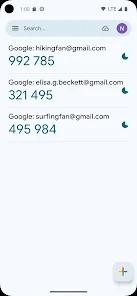
Now let’s talk about those little 6-digit codes that live in apps like Google Authenticator, Authy, or Microsoft Authenticator. The ones that keep changing every 30 seconds. That’s TOTP, which stands for Time-Based One-Time Password.
These work very differently from SMS, WhatsApp, Viber, or email, because the code is not sent over any network. The code is created right on your user’s device, inside the app.
From my perspective, TOTP is a “serious security” option. It is great when you want strong protection and you are okay asking users to take one extra setup step. Once they get past that step, it becomes very simple to use.
How TOTP Works
Your user installs an authenticator app and, during setup, they scan a QR code or type in a setup key that you show them. That QR code holds a shared secret. The app stores this secret, and your server stores the same secret for that user.
From that point on, the app can create a short code, usually 6 digits, that changes every 30 seconds. When the user types that code into your login form, your server runs the same calculation using the current time and the same secret. If the two codes match, you know the user has the right device. That makes it “something you have” rather than “something you were sent”.
Strengths of TOTP (Authenticator Apps)
- Very strong security
With TOTP, the code is not traveling over SMS, email, or chat. There is no message to sniff or re-route, and SIM swap tricks do not help an attacker. To steal a TOTP, someone would usually need the phone itself and, often, the PIN or fingerprint to unlock it. This eliminates man-in-the-middle concerns.
Even if malware is watching SMS or email, it cannot easily read inside the authenticator app. Because of that, many security experts and standards bodies such as NIST recommend app codes over SMS codes.
- Works even when offline
TOTP keeps working with no signal and no Wi-Fi. As long as the phone clock is roughly correct, the app keeps generating valid codes. That is perfect for users who log in from places with weak coverage, like a server room, basement, or rural area. An SMS OTP would never arrive there, but the app code is still ready on the device.
- Gives users more control
Some users simply feel safer when the code lives in an app they control. They do not have to worry about a text being sent to the wrong number or diverted to another SIM. They just open the app, read the code, and type it in.
Power users such as admins, developers, or crypto traders often choose TOTP by default because they like that sense of control.
- No per-use cost
Once a user has set up the authenticator app, you do not pay each time they log in. If they sign in 10 times a day, they use 10 codes, but you send zero SMS messages. That can cut your messaging costs and means you do not run into carrier rate limits. It also scales well, because you are not depending on telecom routes for each login.
- Growing adoption and better usability
A few years ago, authenticator apps felt a bit “too techy” for many people. That has changed quickly. Billions of users have now seen app-based 2FA with services like Google, Microsoft, and gaming platforms.
In one usability study, TOTP actually scored the highest in user satisfaction among common 2FA methods, higher than SMS or push notifications. Setup is the hardest part, but once it is in place, most people find it easy. Some banks even hide the TOTP feature inside their own app, so the user does not need any extra install at all.
- Harder to trick with simple scams
TOTP codes can still be phished, but only in a short time window. If an attacker gets the code, it only works for those 30 or so seconds, then it dies.
They also cannot “plant” a fake code in the user’s inbox or chat and hope the user trusts it, because TOTP codes are always generated by the user. That does not stop very advanced attacks. Users can and are tricked into reading off app codes, but in day-to-day use, TOTP is usually safer than SMS codes.
Weaknesses of TOTP
- Setup is slower and harder for many users
This is the main trade-off. It requires a smartphone (or at least a device that can run the app, could be a PC in some cases) and some technical know-how. Not everyone wants to install an app, scan a QR code, and store backup keys.
One study found that setting up TOTP for 2FA was about 2.5X slower for users than setting up SMS 2FA. Some people get stuck or give up during that flow.
Stats show the same pattern. Twitter once shared that, among users who turned on 2FA, 77% used SMS codes and only about 30% used authenticator apps. People often choose whatever feels easiest, which tends to be SMS. If you push everyone to TOTP only, you should expect more support questions, especially from less technical users.
- You can only use it after enrollment
TOTP is not a “send it once and forget” channel. The user must enroll the authenticator app before you can rely on it. That usually happens during account setup or inside the profile page (“Scan this QR to turn on 2FA”).
If they have not done that, you cannot suddenly use TOTP for a password reset or first login. You always need another channel, such as SMS or email, for the first step.
- Device loss can lock people out
If someone loses their phone, wipes it, or forgets to migrate their authenticator app, their TOTP codes vanish with it. Without a recovery plan, that person is locked out of their account.
This is more of an account management issue. You need to think about backup codes, backup channels, or support flows to reset 2FA.
With SMS, getting a new phone with the same number often just works; and email is accessible anywhere. With TOTP, users need to take more care when they switch devices. The onus is on them to secure or transfer their secret.
- No “push” alert built in
SMS, WhatsApp, and Viber all push the OTP to the user (grab their attention with a notification). TOTP asks the user to remember to open the app and look at the code.
Many users are okay with that, but some find it less convenient, especially if they are used to passive alerts. That is why some companies combine TOTPs with push notifications (e.g., “tap to approve” on an app, which is actually even easier) – but that’s another method entirely (outside scope here).
- Phishing is still possible at higher levels
TOTP blocks many simple attacks, but not all. If a user is on a phishing site that in real-time relays the code to the attacker, the attacker can use it to hijack the session. Advanced “phishing kits” have been known to prompt users for their authenticator code as well.
For that level of threat, systems often move to methods like FIDO2 or WebAuthn hardware keys. Even so, among OTP methods, TOTP is still one of the strongest options you can roll out.
When to Use TOTP
I usually recommend TOTP for security-sensitive applications and power users. Situations where customers are willing to do a little setup. Good examples are fintech products, crypto exchanges, developer platforms like GitHub or AWS, and enterprise tools that guard sensitive data.
Many of these services strongly encourage or even require authenticator-app 2FA because it significantly reduces the chance of account takeover. Even if only 10–20% of your users turn it on, those are usually the ones who care most about security and are most attractive to attackers.
For general consumer apps, I like TOTP as an optional method next to SMS. In sectors such as healthcare and SaaS, admins may ask staff to use authenticator apps to meet strict rules that treat SMS as less secure. If you already have a mobile app, you can make life easier by building the TOTP feature right into it, so users just open your app to get a code for web login. This way they don’t have to install a third-party authenticator.
TOTP is a great upgrade for your high-value accounts. It does not replace SMS, WhatsApp, or email on its own, but it works very well alongside them.
Many teams will implement both TOTP and SMS: e.g., ask users to set up an authenticator app for primary 2FA, but keep SMS as a backup method if they lose the app (or to deliver the initial setup code). That mix gives you strong security for those who want it, while still giving everyone a safety net when phones are lost, apps are wiped, or things go wrong.
Get the Best of All Worlds with Smart Fallback and Multi-channel Flow

Now that we’ve covered each channel individually, the real power comes when you mix them in a smart way instead of betting everything on one option. No single channel is perfect for every user, every device, and every country, but a multi-channel OTP flow with fallback can get you very close to “it just works” for almost everyone.
The concept of smart fallback is simple: You start with your main channel. If the code does not arrive or the user does not use it in time, your system quietly tries a second channel, and maybe even a third. You are not making the user chase codes. You are just giving the code more than one way to reach them so logins and payments do not die at the OTP step.
Why Fallbacks Matter
Even with high delivery rates, a small percentage of OTPs will fail on the first try. It might be 1-5% due to various reasons (SMS carrier issues, WhatsApp not installed, email in spam, etc.).
Any small failure rate hurts at scale.
If you’re sending millions of OTPs, thousands of users could be blocked from logging in or checking out a cart. That means frustrated customers, abandoned sign-ups, or expensive support calls
About 31% of organisations participating in a recent survey said that 11–20% of their OTPs never get delivered at all. Almost half of those failures came down to something as simple as the user entering the wrong phone number. A smart fallback flow can win back a large chunk of that lost traffic and push your real success rate close to 99.9% in practice.
Fewer users get stranded just because one channel had a bad day.
How Smart Fallback Works
Here is an example flow that I see many teams start with:
1. Start with SMS
You send the OTP by SMS to the user’s number and wait a short period, say 30 seconds. During that time you look for a delivery signal or for the user to enter the code.
2. Move to WhatsApp if needed
If there is no delivery signal and the user still has not entered the code, you try WhatsApp OTP to the same number, if WhatsApp is available. The user might have weak SMS signal but good Wi-Fi, so the WhatsApp ping lands first and they use that code.
3. Use email as a last step
If nothing has worked after another short window, you send an email OTP to the user’s registered address. That gives them one more path in case both phone channels are having issues or the number was not WhatsApp-enabled.
The first code that the user enters (regardless of channel) will verify their login, and at that point you can invalidate any other code attempts.
From the user’s point of view, they just see the option that works in the moment. Maybe the SMS is slow, but a WhatsApp notification pops up and “saves” the login. Or maybe they never get a phone code, but the email arrives and gets them in. They do not need to think about the routing logic; you do that for them.
You can also tune the order by country or segment instead of using the same ladder everywhere. For users in India, you might start with WhatsApp then fall back to SMS. In the Philippines you might try Viber first, then SMS. In the US, you could go SMS then email. Across much of Europe, you might lead with WhatsApp, then go to SMS, then email.
This is what I mean when I talk about building “routing ladders” per region, so you start with the channel most likely to succeed there.
Don’t Forget User Experience
Fallback is great, but it can also confuse people if you do it carelessly. If a user gets three different messages on three different channels, they need to know that these all relate to the same login and which code is safe to use. You do not want someone trying an old SMS code after you already sent a fresh email code.
One simple trick is to keep the same OTP for a short period across channels. If the SMS code is 123456, you can send “Your code is 123456” again on WhatsApp and email, instead of creating brand new codes each time. The user can then use whichever message they see first.
If you prefer unique codes per channel for tracking, add a clear line such as “If you get more than one code, use the latest one.” In every message, show your service name and a familiar format so the user can trust that it is you and not a phishing attempt.
Cost Considerations
One concern might be, “If I send 3 messages instead of 1, am I paying triple? Won’t my bill explode?” It can, but you can control that quite well.
- Only some users trigger fallback
Most users will still complete with the first channel. If 85–90% of people get the OTP on the first try, only the remaining 10–15% will ever trigger a second or third channel. So you are not tripling costs for everyone, only adding layers for the small group that needs extra help.
- Some pricing models are “per verification”
Many OTP providers offer plans where you pay a single fee for a successful verification, no matter how many channels were tried in the background. Others may charge per message, but credit failed deliveries.
It is worth checking this, because the small extra spend per recovered login is often tiny compared to the revenue saved or the support time avoided.
- Use cheaper channels as fallback
You can also order your ladder based on price. If SMS is very expensive in one country, you might start with WhatsApp and only use SMS when WhatsApp fails. You can use email, which is almost free, as a final catch-all for users who still have not verified. In my experience, the extra few cents for a second message are usually nothing compared to losing a paying customer at checkout.
Broadcast vs Sequential
Most of the time, sequential fallback (try A, then B, then C) is the friendliest approach. It keeps noise low and only adds new messages when the previous step did not work. That is what I suggest for standard logins, sign-ups, and order checks.
There are rare cases, though, where speed is so important that teams fire all channels at once. This is more like “broadcast” mode. For example, an enterprise VPN might send a push, an SMS, and an email code at the same time when an admin logs in from a risky location. It costs more and creates more notifications, but it makes the chance of missing the code very small.
Because of the extra cost and noise, I usually see this reserved for very high-risk actions, not day-to-day OTP.
Adding Fallback to Your Strategy
If you want to add smart fallback to your flows, I suggest you treat it like a small project rather than a quick toggle. You can start this way:
- Plan your channel order
Pick a default ladder (for example, SMS → WhatsApp → email) and then adjust it for key countries or user types using what you already know about your audience.
- Set clear timeouts and triggers
Decide how long you will wait before moving to the next channel. Maybe you fall back if you see no delivery status in 30 seconds or if the user hasn’t entered a code within one minute.
- Keep messages consistent and clear
Use the same brand, tone, and basic wording across channels. Add a simple line explaining that they may see the code in more than one place, and what to do if that happens.
- Monitor and refine
Track OTP success rates by country, carrier, and channel. If you see one route failing often in a region, test a different order or work with a better provider there. If email codes are slow, tune your email setup so they reach the main inbox faster.
Choosing the Right OTP Channels for Your Needs
Now you’ve got a whole toolbox of OTP options. Which one should you actually use, and when? I’ll walk you through how I think about it, so you can build a mix that fits your users, your budget, and your risk level.
You don’t have to pick only one channel forever. In most cases, the best setup is a small bundle of channels that work together, with fallback rules behind the scenes.
Where reachability matters most
If your main worry is “Will this code reach my user?” then SMS has to be in your plan. Almost every adult who owns a phone can get a text, even on a basic device with no data. For a broad or global user base, SMS is the baseline delivery method.
That said, SMS shouldn’t be the only channel you trust. Pair it with at least one backup, like email. If someone doesn’t get the text because of a carrier issue or a typo, being able to say “No problem, we’ll send it to your email too” can save that login or checkout.
Where security and fraud risk come first
When working with money, health data, or sensitive business tools, security jumps to the front of the line. For those cases, I’d encourage you to offer TOTP authenticator apps as an option. They are much harder to break because there is no SIM swap risk and no OTP traveling over SMS or email.
You can also improve security by sending OTPs over encrypted apps like WhatsApp or Viber. These give you end-to-end encryption, verified business IDs, and less chance of spoofed messages. A common pattern in banking is to send codes via WhatsApp or Viber first, then fall back to SMS only if the user doesn’t have those apps.
Where cost efficiency is the #1 priority
If your finance team is watching spend, pricing by region matters a lot. In many countries, WhatsApp or Viber OTPs are cheaper than SMS, especially for cross-border traffic. Email is cheaper still and is basically free once your mail setup is in place.
A “wallet-friendly” flow might be: try WhatsApp first in markets where it’s strong, use SMS only when that fails, and send an email as the final tool. You can also look for a provider that charges per successful verification instead of per message, so you’re not paying full price for every failed attempt in a fallback chain.
Where user experience and branding matter to you
If you care about how your brand looks and feels at every touchpoint, then richer channels help. WhatsApp and Viber let you show your verified business name, logo, and a clean layout, which makes your OTPs feel more trustworthy than a random number sending plain text.
Where those apps are not an option, you can still improve SMS by using an alphanumeric sender ID in countries that support it. Seeing “YourBrand” as the sender instead of a strange long code makes it more likely that a user opens the message and uses the OTP without second-guessing it. The easier you make it to spot and copy the code, the smoother that whole flow feels.
Where users are spread across many regions
If you serve users in several countries, you’ll quickly learn that channel habits change with the map. Some markets are WhatsApp-heavy, others love Viber, others still are more SMS-centric or email-centric. There is no single “best” channel everywhere.
For that reason, I usually recommend an omnichannel setup with user choice built in. During onboarding, you can ask: “How do you want to get your codes? Text, WhatsApp, or Email?” Let the user pick what they trust, then keep a fallback ready if their first choice fails. A friendly message like “We couldn’t reach your phone, so we’ve sent a code to your email instead” keeps things clear.
Industry Snapshots
Different industries tend to lean in different directions. Here’s how I see it play out:
-
Fintech and Banking: These teams care a lot about fraud, so they often encourage authenticator apps or encrypted channels like WhatsApp. SMS is still common, but more banks now warn users about SIM swap and push higher-security options.
For instance, a customer who is traveling may not get your SMS OTP to approve a payment. A quick WhatsApp or email backup lets them complete the transaction instead of calling support from an airport queue. Parallel email alerts can also help reduce SIM swap risks.
Fallback is very important here, because a blocked transaction means a very stressed customer and a likely call to support.
-
E-commerce: Here, speed and conversion are the big goals. Most brands use SMS and WhatsApp for quick OTPs at checkout or sign-up, because the user usually has their phone in hand. If the first code doesn’t arrive, an email fallback can rescue the sale.
Email OTPs also work well for lower-urgency checks, such as confirming an email address or changing profile details.
-
Healthcare: Patient portals often start with SMS because it reaches the widest group, including older patients. Many will also offer email for those who prefer it. In areas with weak mobile coverage but decent Wi-Fi, an app code (TOTP) or a WhatsApp message can be a big help.
Privacy is central here, so encrypted channels and clear branding are important.
-
Logistics and Delivery: Couriers rely on whatever works on the road, so SMS is still the default for locker codes, delivery confirmations, and handover OTPs. If an SMS fails or the number was entered wrong, some services will use an automated voice call or email backup.
More logistics apps are adding WhatsApp updates and OTPs now, because drivers and customers often use it all day.
-
SaaS and Tech: Software companies tend to have more tech-savvy users, so they’re more open to authenticator apps for 2FA. Email OTP is also popular because users are on their laptops already. SMS is still offered for convenience, but many tech brands de-emphasize it due to security concerns.
Fallback here is usually focused on account recovery: if a primary method fails or a device is lost, an email or SMS backup helps users get back in.
Let Each OTP Channel Do What It Does Best For You
The “right” OTP strategy is rarely a single channel. The strongest setups mix channels and let each one do what it does best, while covering for its weak spots.
If you want a simple starting point, I often suggest a mix like this: SMS + one chat app (WhatsApp or Viber) + email + optional TOTP for power users.
SMS gives you reach almost everywhere. The chat app gives you better security, branding, and often lower cost where adoption is strong. Email catches users who can’t use their phone right now. TOTP gives your security-conscious users a higher level of protection if they want it.
The power is not just in the list, but in how you arrange them and add smart fallback behind the scenes.
When you do that well, those “I didn’t get the code” moments drop way down. Users feel like the system “just works”, even when one channel fails in the background. You add security without adding extra stress, which is exactly what 2FA is supposed to do.
Try SMS.to today and Reach Customers Instantly on Their Favourite Channel
Send personalised messages via SMS, WhatsApp, Telegram, RCS or Viber.
